How to Add Dynamic Years to a JetEngine Meta Box Select Field
If you’re using a JetEngine Meta Box Select Field for something like a project completion year, you may want the available years to update automatically. Instead of manually adding new years every year, you can create a custom JetEngine Options Source that generates the years dynamically using PHP.
Add the Custom JetEngine Options Source
In this example, the field is called completion_year and is attached to a Projects custom post type. The goal is to show the current year and the previous 10 years in ascending order.
Add this to your theme’s functions.php or a code snippets plugin:
/**
 * @snippet		Dynamically Add Current and Previous Years to a JetEngine Meta Box Select Field
 * @author		Anjan Phukan
 * @plugin		JetEngine
 * @testedwith	JetEngine 3.8.15.2
 * @tutorial	https://www.zealopers.com/wordpress-tutorials/how-to-dynamically-add-current-and-previous-years-to-a-jetengine-meta-box-select-field/
 */

 /**
 * Add Project Completion Years as a JetEngine option source.
 */
function zlp_add_project_years_option_source( $sources ) {

    $sources['project_completion_years'] = 'Project Completion Years';

    return $sources;
}

add_filter(
    'jet-engine/meta-boxes/option-sources',
    'zlp_add_project_years_option_source'
);


/**
 * Generate the project completion years dynamically.
 *
 * Current year + previous 10 years.
 */
function zlp_project_completion_year_options( $options, $field ) {

    if (
        empty( $field['options_source'] ) ||
        'project_completion_years' !== $field['options_source']
    ) {
        return $options;
    }

    $current_year = (int) wp_date( 'Y' );

    $start_year = $current_year - 10;

    $options = array();

    // Display years in ascending order.
    for ( $year = $start_year; $year <= $current_year; $year++ ) {
        $options[ (string) $year ] = (string) $year;
    }

    return $options;
}

add_filter(
    'jet-engine/meta-fields/field-options',
    'zlp_project_completion_year_options',
    10,
    2
);
Select the New Options Source
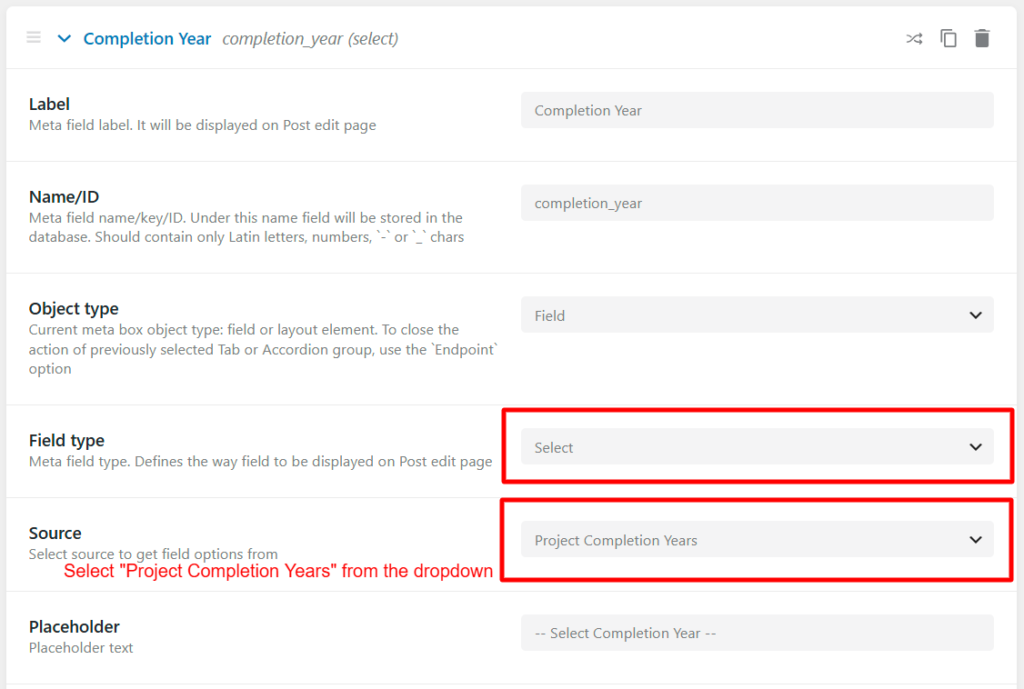
Once the code is active, edit your JetEngine Meta Box and open the completion_year Select field. Under Source, select Project Completion Years and save the Meta Box.
The Years Update Automatically
The years are generated from the current WordPress year, so you don’t need to update the field manually. In 2026, the list runs from 2016 to 2026. When 2027 arrives, the range automatically moves forward to 2017–2027.
Using the Field in Your Project CPT
The selected year is stored normally in the completion_year meta field, so you can use it later with Elementor Pro, Bricks Builder, JetEngine queries, filters, or other dynamic content. This makes the JetEngine Meta Box Select Field useful for keeping project information consistent across your website.